Play Text-to-Speech:
Sharpen your trading skillset in MetaTrader 5’s Visual Tester — practice, learn, and de-risk your execution with a professional multi-indicator trainer.
Buy / try: Trading Skill & Strategy Tester on MQL5 Market — https://www.mql5.com/en/market/product/146508?source=Site+Market+MT5+Utility+New+Rating006
Executive summary
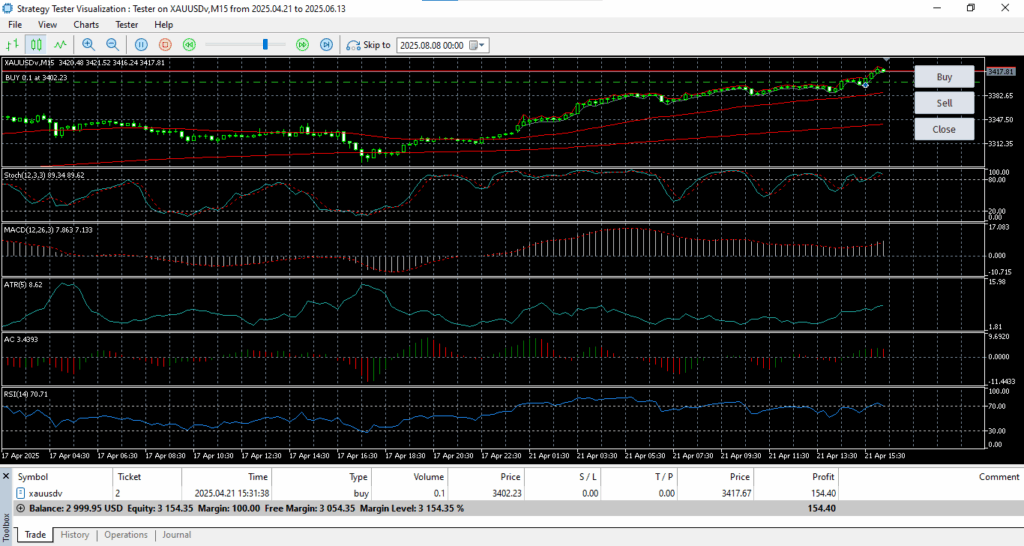
Execution — the ability to take a well-defined trading plan and apply it accurately under market pressure — is one of the most underestimated and under-trained skills in retail trading. The Trading Skill & Strategy Tester is a manual execution training utility for MetaTrader 5’s Visual Strategy Tester that focuses purely on training trade timing and trade management using real historical data. It exposes a customizable indicator toolkit (EMA50/EMA200, Stochastic, MACD, ATR, Accelerator Oscillator, RSI), and provides on-chart Buy / Sell / Close buttons for instantaneous execution in Visual Tester sessions.
This article explains why such a tool matters, how it fits into trader development, practical workflows and exercises, recommended configurations, technical details and limitations.
Why execution training matters
When traders talk about strategy development they usually focus on rules — entry conditions, stop placement, position sizing, and profit targets. Those are necessary, but insufficient. Two consistent causes of underperformance are:
- Poor timing and hesitation — even the best signal is worthless if the trader fails to execute when it appears; and
- Sloppy trade management — incorrect stop placement, forgotten stops, late exits, and inconsistent sizing.
Academic and practitioner literature supports the idea that behavioral and procedural skills (speed, consistency, discipline) materially affect trading performance. Training in a risk-free, repeatable environment accelerates the learning curve: you can test the same scenario hundreds of times using historical data and focus on execution rather than market risk.
The Trading Skill & Strategy Tester is explicitly designed to address this gap — it’s not an automated EA; it’s a manual execution simulator that runs within MT5 Visual Tester and helps traders practice speed and consistency using the real price history and indicators they use in live trading.
Product at a glance
- Name: Trading Skill & Strategy Tester.
- Platform: MetaTrader 5 (Strategy Tester, Visual Mode).
- Author / Vendor: PT KARSA REKA CIPTA.
- Price: USD 100 (as listed).
- Version: 1.3 (current as of the product page).
- Published: 8 August 2025.
- Primary features: Toggleable indicators (EMA50/EMA200, Stochastic, MACD, ATR, Accelerator Oscillator, RSI), chart-based buttons for Buy / Sell / Close, customizable input parameters, designed for visual testing and practice.
The value proposition — what traders actually get
- Muscle memory for execution
Execution speed often differentiates consistently profitable traders from those who fail. Using this EA in Visual Mode lets you repeatedly execute identical signal patterns (on the same historical bars) until pressing Buy/Sell is automatic and timed to the exact moment you want. - Risk-free repetition
You can practice high-frequency scalping, quick order placement, partial exits, and trailing decisions with no live capital at risk. - Customizable indicator mix
Not everyone trades the same way. The EA lets you toggle indicators on/off and change periods — emulate different strategy setups without changing code. - Test trade management decisions
Close-all buttons and simple trade execution let you test whether your management choices (moving stops, partial scaling-out) are applied consistently across market conditions. - Transferable to live discipline
The goal of practice in Visual Tester is not to replace live trading but to reduce the friction between decision and action; this can improve order timing, reduce slippage-related mistakes, and help you internalize stop loss discipline.
Who should use this and how
Beginners
Use the EA to build confidence. Start with a single indicator (for example, EMA50 + Stochastic) and practice entering on confirmed signals. Focus on consistent lot sizing, disciplined stop placement, and single-execution speed.
Intermediate traders
Stress-test a formal edge. If you have a strategy based on EMA cross plus MACD confirmation, load the same indicator mix in the EA and practice managing a sequence of trades across a particular market (e.g., EURUSD, M5) to see how you react under volatility spikes and fast price swings.
Professionals / coaches
Use the EA as a teaching tool. Ask a student to practice a specific exercise (e.g., “enter when price retests EMA50 after MACD positive crossover”) and then review recorded Visual Tester sessions to pinpoint behavioral errors.
Practical training workflows (step-by-step exercises)
Below are structured practice sessions you can use. Each is purpose-built: duration, objective, setup, and performance metrics.
Exercise 1 — Basic timing & entry (30–60 minutes)
Objective: Improve speed and decisiveness on primary entries.
Setup: Load chart, timeframe M5 or M15, enable EMA50 + EMA200 + Stochastic (or only EMA50 for starters), lot size small. Start Visual Tester on a period with medium volatility.
Procedure: For 30 minutes, only enter trades that match the rule: price above EMA50 and Stochastic cross above signal line. Execute the trade immediately when conditions are met, place stop 1×ATR away, and take profit at 2×ATR. After each trade, record reaction time (bars since condition met) and whether you followed the stop/TP.
Metrics: Entries per hour, average reaction time (seconds), stop adherence (% of trades that keep stop), profit factor simulated.
Exercise 2 — Trade management under stress (45–90 minutes)
Objective: Practice partial exits, trailing stops, and rescue decisions.
Setup: Enable ATR, MACD, RSI. Choose a volatile timeframe (M1–M5) and predefine rules (e.g., scale out 30% at +0.5×ATR, move stop to breakeven at +1×ATR).
Procedure: Start visual test, execute trades per rule, apply partial exits and trailing stops manually. Force a rule-break scenario: manually cancel your stop in one trade and note behavioral impulse.
Metrics: Rule adherence rate, slippage (simulated), improvement over session.
Exercise 3 — Strategy stress test (multi-hour)
Objective: Validate strategy execution consistency across multiple sessions.
Setup: Load the exact indicator mix you would use live (EMA50/200, MACD, RSI, ATR), set timeframe and lots corresponding to your risk model.
Procedure: Run multiple quickback iterations across different days of history. For each day, use the same entry/exit rules and try to simulate 20 trades per day. Compare P/L, max drawdown, consistency of stop usage.
Metrics: Variability of edge across days, behavioral consistency, largest deviations from plan.
Suggested indicator presets and why they matter
The EA exposes several indicators. Below are practical presets and the rationale behind them.
- EMA50 / EMA200 (trend context) — EMA50 as short-medium trend, EMA200 as long-trend filter. Trade in direction of EMA200 for higher probability setups.
- Stochastic (12,3,3) — effective for pullback entries and identifying oversold/overbought on small timeframes.
- MACD (12,26,3) — trend and momentum confirmation; helps avoid trades against strong momentum.
- ATR (5) — short-period ATR to set stop placements for scalping sessions.
- Accelerator Oscillator — detects short-term shifts in momentum that often precede reversals.
- RSI (14) — provides relative strength context and divergence spotting.
Toggle these on/off to simulate different strategy families. The default mix the EA ships with (EMA50/200, Stoch, MACD, ATR, AC, RSI) is designed to cover trend, momentum, volatility and timing — a comprehensive training palette.
Technical notes and best practices
- Run in Visual Mode: The EA is built specifically for MT5 Visual Tester — it replicates historical prices and allows you to place orders that simulate real execution on historical ticks. Always use Visual Mode, not backtest numeric results only.
- Indicator placement: EMAs are plotted on the main price chart; oscillators are in subwindows. This mimics standard live trading layouts and reduces cognitive switching.
- Chart memory and performance: Visual Tester with many subwindows and long history can be resource-heavy. When practicing rapid execution, reduce unnecessary indicators or limit history window to keep UI responsive.
- Not an automated EA: Emphasize to buyers that this product is a training utility, not an auto-trader. It intentionally exposes manual controls and does not trade on its own.
Common objections & answers (FAQ)
Q — Why buy this if I can just use the chart and place trades manually?
A — The Visual Tester provides a repeatable historical environment with tick-level simulation and the ability to replay exact setups. That repeatability is impossible in a live chart and tedious with ordinary chart playback.
Q — Can it be used on live accounts?
A — It’s designed for the Strategy Tester. Some users may adapt code for live trading, but the product is intended as a practice/training tool (and the listing states this clearly).
Q — Is this suitable for all asset classes?
A — Yes; use the same EA on FX, indices, commodities or crypto when your broker’s history includes those instruments. Choose the timeframe and symbol with appropriate volatility for your practice goals.
Q — What support and updates are included?
A — The MQL5 page lists free lifetime updates and support via MQL5 messages (check page for current terms).
How to buy & initial setup (step-by-step)
- Visit the product page on MQL5: https://www.mql5.com/en/market/product/146508?source=Site+Market+MT5+Utility+New+Rating006.
- Purchase the EA using your MQL5 account and download the .ex5 file.
- Place the .ex5 in the
MQL5/Expertsfolder and restart MT5. - Open Strategy Tester → Visual Mode → Load
Trading Skill & Strategy Tester. - Choose symbol and timeframe, enable the indicators you prefer via inputs, and press Start.
Limitations
- The EA trains manual execution only — it does not automate your strategy.
- Performance in Visual Tester is an approximation of live conditions; slippage and broker execution differences exist in reality (network latency, order queueing, spreads variability at news times).
- The EA is only as useful as the training regimen; recommend to commit on repeated, structured practice for measurable improvement.
Conclusion
If you’re serious about bridging the gap between strategy and execution, the Trading Skill & Strategy Tester is a focused, practical tool that provides structured, repeatable practice in the MT5 environment. It’s suitable for traders at every level and especially valuable for anyone preparing to go live with a new strategy or trying to improve speed and discipline.
Buy / Learn more: https://www.mql5.com/en/market/product/146508?source=Site+Market+MT5+Utility+New+Rating006.
Appendix — quick checklist for training sessions
- Choose 1-2 indicators initially (avoid clutter).
- Set lot size to a small amount to remove emotional attachment.
- Measure reaction time and rule adherence.
- Run sessions daily for at least 2 weeks for behavioral change.
- Record notes after every 10 trades: what went right, what went wrong.

Maintenance, projects, and engineering professionals with more than 15 years experience working on power plants, oil and gas drilling, renewable energy, manufacturing, and chemical process plants industries.